Angular Signals and NgRx Signal Store: A Pagination State Management Feature
August 26th, 2025 | 3 min read
Last update: August 29th, 2025

In the last post, I showed the dialog feature (you can find the previous post here). Let's continue with the next feature: Pagination!
As always, if you want to see the complete code checkout the github repository:

NgRx Signal Store Feature
The pagination feature doesn't have many things to keep track of:
- Current page
- Page size
- Total paging elements
- Available page sizes
Let's define the types and interfaces first again:
export type Paging = {
    page: number;
    size: number;
};

export interface PaginationInfo {
    pagination: Paging;
    totalPagingElements: number;
    pageSizes: number[];
}Now we can create the feature:
import { computed } from '@angular/core';
import { patchState, signalStoreFeature, withComputed, withMethods, withState } from '@ngrx/signals';

export function withPagination(state?: Partial<PaginationInfo>) {
    let initialState: PaginationInfo = {
        pagination: {
            page: 0,
            size: 25,
        },
        totalPagingElements: 0,
        pageSizes: [10, 25, 50, 100],
    };

    if (state) {
        initialState = {
            ...initialState,
            ...state
        };
    }

    return signalStoreFeature(
        withState<PaginationInfo>(initialState),
        withComputed((state) => ({
            totalPages: computed(() => Math.ceil(state.totalPagingElements() / state.pagination.size())),
            hasNextPage: computed(() => state.pagination.page() < Math.ceil(state.totalPagingElements() / state.pagination.size()) - 1),
            hasPreviousPage: computed(() => state.pagination.page() > 0),
        })),
        withMethods((store) => ({
            setPagination(pagination: Paging) {
                patchState(store, (state) => ({
                    ...state,
                    pagination,
                }));
            },
            setPage(page: number) {
                patchState(store, (state) => ({
                    ...state,
                    pagination: {
                        ...state.pagination,
                        page,
                    },
                }));
            },
            setPageSize(size: number, page = 0) {
                patchState(store, (state) => ({
                    ...state,
                    pagination: {
                        ...state.pagination,
                        size,
                        page,
                    },
                }));
            },
            setTotalElements(totalElements: number) {
                patchState(store, (state) => ({
                    ...state,
                    totalPagingElements: totalElements,
                }));
            },
        })),
        withMethods((store) => ({
            nextPage() {
                if (store.hasNextPage()) {
                    store.setPage(store.pagination.page() + 1);
                }
            },
            previousPage() {
                if (store.hasPreviousPage()) {
                    store.setPage(store.pagination.page() - 1);
                }
            },
        })),
    );
}This is a pretty small feature, but it doesn't need much to keep track of the active state! This makes it much easier to integrate with other stores regardless of where the data comes from (REST API, GraphQL, local data, etc.) or what it looks like.
Here's how some of the UI using the pagination store could be like:
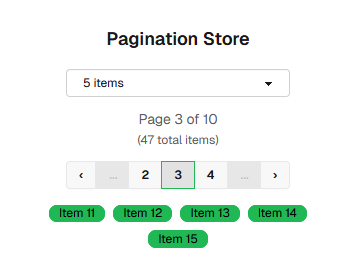
What a neat little feature!
Scope limitations
You have probably already noticed that the withMethods is defined twice.
This is necessary because of TypeScript's function scope limitations:
// This wouldn't work - scope limitation
withMethods((store) => ({
    setPage(page: number) {  },
    nextPage() {
        // Error: setPage is not accessible here
        this.setPage(store.pagination.page() + 1);
    },
}))
Each withMethods creates its own function scope. The store parameter in each call has access to:
- First call: Base store + computed properties (from
withComputed) - Second call: Base store + computed properties + methods from first
withMethods
That's a small limitation, but it's easy to work around.
What's Next?
We are going to create a HTTP feature! Combined with the pagination feature, this will allow us to create a paginated REST API state management store.
And to illustrate how this can be used, we're going to create a mock service for querying Pokémon data :)
More links to explore
That's all for now—hopefully, you found this post helpful and maybe you can use this pagination feature in your own Angular application :)